How to Do Keyword Research with Claude Code (Free Workflow + Skill)
By Shubhranshu, creator of claudeagents · Last reviewed
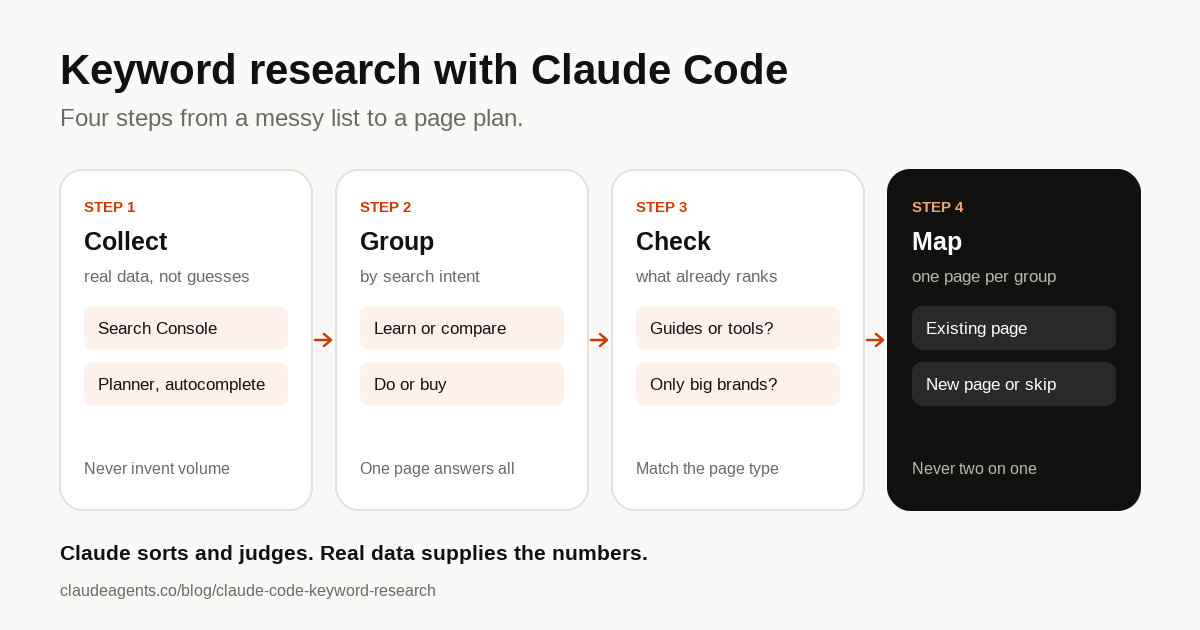
To do keyword research with Claude Code, give it real keyword data (Search Console, Keyword Planner or an SEO tool export), then ask it to clean the list, group keywords by search intent, check what kind of pages rank, and map each group to one page on your site. Claude is great at the sorting. It can't see search volume by itself, so never let it guess numbers.
This guide walks through that workflow with four copy-paste prompts, then packs it into a free skill you can reuse on every project.
What Claude Code can and can't do for keyword research
| Job | Claude Code alone | Claude Code with your data |
|---|---|---|
| Search volume | No, it will guess | Yes, from Keyword Planner or a paid tool |
| Your real queries | No | Yes, from Search Console |
| Cleaning and de-duplicating lists | Yes | Yes |
| Grouping by intent | Yes | Yes, and better with real queries |
| Checking what ranks | Yes, with its web search tool | Yes |
| Matching topics to your pages | Yes, it can read your site | Yes |
The pattern is simple: data from tools, judgment from Claude, final call from you. Paid SEO tools such as Semrush and DataForSEO also offer MCP servers, which let Claude pull their numbers directly. You don't need one to start.
Step 1: collect real keyword data
Make a keywords folder in your project with a data folder inside it. Add keywords/data/ to .gitignore if your repo is public. Then put in as many of these as you have:
- Search Console queries. Performance report, last 3 months, Export as CSV. These are searches you already appear for. Our Search Console + Claude Code guide shows how.
- Keyword Planner. Free inside a Google Ads account. Expect volume ranges, not exact numbers, unless you run ads.
- Autocomplete and People also ask. Type your seed keyword into Google and paste what it suggests into a text file.
- Customer questions. Support emails, replies on X, Reddit threads. These are the words real buyers use.
# keywords/seeds.md

## What we sell
A kit of Claude Code agents for coding, SEO and marketing.

## Who buys
Solo founders and small teams who already use Claude Code.

## Seed keywords
claude code agents
claude code seo
claude code subagents

## Questions customers ask (from support, X replies, Reddit)
how do I make claude code follow my rules
can claude code do seo
is claude code free
The seeds file matters more than it looks. It tells Claude what you sell and who buys, so it can drop keywords that would bring the wrong visitors.
Step 2: let Claude clean and merge the list
Start claude in your project and paste this. It turns four messy files into one clean list, and keeps track of where each keyword came from.
Read keywords/seeds.md and every file in keywords/data/.

1. Build one list of keyword ideas from those files only.
   Don't add keywords that aren't in the files.
2. Remove duplicates and near-duplicates (plural, word order).
3. Keep the source column for each keyword: gsc, planner, autocomplete or questions.

Save it as keywords/all.csv with columns: keyword, source, impressions, volume.
Leave a number empty if the file didn't have it. Don't estimate.
The last line is the important one. Ask an AI for "keyword ideas with search volume" and it fills the column anyway. An empty cell is honest. A made-up 2,400 can send you writing the wrong article for a month.
Step 3: group keywords by search intent
This is where Claude saves the most time. Grouping 300 keywords by hand takes an afternoon. Claude does it in a minute, and it's good at spotting that "claude code subagents" and "how to make a claude code agent" are the same search.
| Intent | The searcher wants to | Best page type |
|---|---|---|
| Learn | Understand something | Guide or explainer |
| Compare | Pick between options | Comparison or list |
| Do | Get a task done now | Tool, template or step-by-step |
| Buy | Find something to pay for | Product or pricing page |
Read keywords/all.csv.

Group keywords that one page could fully answer. Two keywords belong together
only if the same page would satisfy both searches.

For each group:
- name the main keyword (the clearest wording, not the biggest number)
- label the intent: learn, compare, do, or buy
- suggest the page type: guide, comparison, tool, list or product page

Save as keywords/clusters.md. Put groups with fewer than 3 keywords at the end.
Step 4: check what actually ranks
Google already shows you what it thinks each search wants. Claude Code has a web search tool, so it can look for you. Check the top results yourself for anything you're about to write.
For the top 10 groups in keywords/clusters.md, search the main keyword
with your web search tool.

For each one, tell me:
- what kind of pages rank (guides, tools, product pages, videos, forums)
- whether big brands hold every top result
- one thing the ranking pages all miss

If your search results don't show enough, say "check manually" instead of guessing.
A real example from this site: before writing this page, we searched "claude code keyword research" on November 23, 2026. The results were step-by-step guides, ready-made skills and video walkthroughs, and most of the guides relied on a paid SEO tool. So we wrote a guide with a free skill that works with free data, instead of yet another tool review.
Step 5: map every group to one page
Now turn topics into a plan. Claude can read your sitemap and content, so it can tell you which groups you already cover and which need a new page.
Compare keywords/clusters.md with the pages on this site
(read the sitemap and the content folders).

For each group, choose one:
- already covered: name the page, and say if it needs a new section
- new page: give a URL under 5 words, a title under 60 characters and the intent
- skip: say why (wrong intent, no fit with what we sell)

Never give two groups the same page. Flag any two existing pages that
target the same group. Show the list and wait for my approval.
"Never give two groups the same page" is the rule that protects you. When two of your pages chase the same search, they split your links and Google has to guess which one to show. Often it shows neither one high.
Turn it into a free keyword research skill
Running five prompts every time gets old. A skill packs the whole workflow into one file that Claude Code loads when you ask for keyword research. Save this as .claude/skills/keyword-research/SKILL.md in your project.
---
name: keyword-research
description: Turns keyword exports and seed lists into clusters, intents and a page plan. Use when asked for keyword research, topic ideas or a content plan.
---

# Keyword research

Work only from files in keywords/. Never invent search volume,
difficulty or rankings. If a number is missing, leave it empty.

1. Read keywords/seeds.md and every file in keywords/data/.
2. Merge everything into keywords/all.csv (keyword, source,
   impressions, volume). Remove duplicates.
3. Group keywords that one page could fully answer.
   Label each group: learn, compare, do or buy.
4. For the top 10 groups, search the main keyword and note
   what kind of pages rank.
5. Map each group to an existing page, a new page, or skip.
   One group per page. Flag pages that overlap.
6. Write keywords/plan.md with the top 5 jobs first.
   Ask before creating or editing any page.
Then just say "do keyword research for the pricing page" and Claude follows the same steps every time. New to skills? Read how Claude Code skills work first.
Mistakes that waste a month
- Trusting numbers Claude wrote itself. If a number didn't come from a file or a tool, delete it.
- Chasing the biggest keyword. A new site rarely ranks for broad terms. Long, specific searches convert better and rank sooner.
- Writing a blog post for a "do" search. If the top results are tools, a 2,000-word guide won't beat them.
- One page per keyword. Ten near-identical pages compete with each other. One page per intent wins.
- Never checking again. Re-run the Search Console step every few months. Your real queries will surprise you.
After the research: writing and fixing the pages
Keyword research tells you what to write. To check pages you already have, use the free audit skill in our Claude Code skills for SEO guide, or the technical SEO audit walkthrough.
If you'd rather not build all of this yourself, the claudeagents SEO kit gives you /keyword-research and /content-brief commands plus 28 SEO agents that work together in Claude Code.
Frequently asked questions
Can Claude Code do keyword research?
Yes. It can clean keyword lists, group them by intent, check what ranks with web search, and match topics to your pages. It can't see search volume on its own, so give it data from Search Console, Keyword Planner or an SEO tool.
Does Claude know search volume?
No. Any volume it gives without a data source is a guess. Tell it to leave numbers empty unless they come from a file or a connected tool.
Can I do keyword research with Claude Code for free?
Mostly, yes. Search Console, Keyword Planner and autocomplete are free, and the skill in this guide is free. You need your own Claude Code access.
Is Claude better than Semrush or Ahrefs for keyword research?
They do different jobs. Semrush and Ahrefs have the search data. Claude is good at sorting and judging it. Many people use both, often through an MCP server.
How many keywords should one page target?
One main keyword plus all the close variations that share its intent. If one page can fully answer them all, they belong together.
Sources
Skip the setup: get 85 ready-made agents
Coding, SEO and marketing kits for Claude Code, with 52 skills and 53 slash commands. $29 one-time, lifetime updates.
See what's included →