Claude Code Plugins: How to Install Them, the 15 Best, and How to Make Your Own
By Shubhranshu, creator of claudeagents · Last reviewed
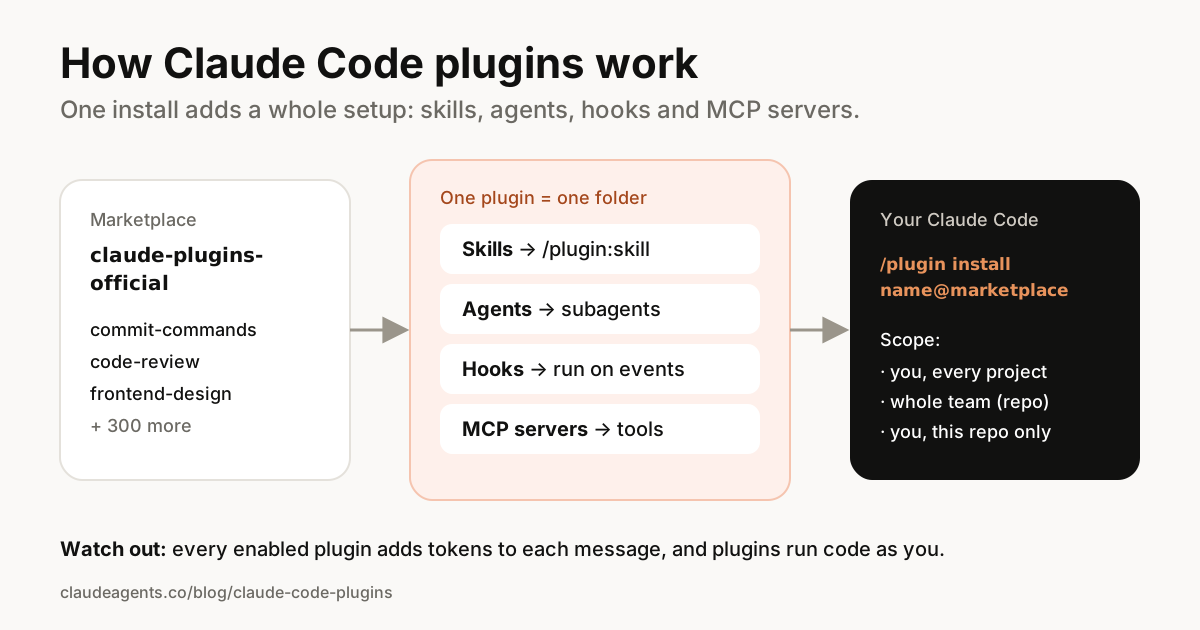
A Claude Code plugin is a folder of skills, subagents, hooks and MCP servers that Claude Code installs as one unit. Instead of copying files into .claude/ by hand, you run one command, such as /plugin install commit-commands@claude-plugins-official, and everything the plugin contains is ready to use.
Anthropic runs an official marketplace that Claude Code adds for you automatically. On 16 November 2026 it listed 317 plugins, from Git helpers and code reviewers to integrations for GitHub, Figma, Sentry, Stripe and Supabase. This guide explains how plugins work, the commands you need, the 15 we'd install first, and how to make your own.
What is a Claude Code plugin?
According to Anthropic's plugin docs, a plugin is a directory of components with a small manifest file at .claude-plugin/plugin.json. The components are the same building blocks you can already use on their own:
- Skills: instructions Claude loads when relevant, which you can also run as slash commands. See our skills guide.
- Agents: subagents Claude can hand work to.
- Hooks: commands that run at set moments, such as after every file edit. See the hooks guide.
- MCP servers: connections to outside tools like GitHub or a database. See MCP setup.
- Language servers (LSP): code intelligence for languages like TypeScript, Python and C#.
The value of a plugin is packaging: someone else built and tested the setup, you install it with one command, and it updates from its marketplace.
Plugins vs skills vs MCP servers: which do you need?
- A single skill or subagent: you don't need a plugin. Save it in
~/.claude/skills/or.claude/agents/and it works. - A connection to one tool: a plain MCP server is enough. Add it with
claude mcp add. - Several pieces that belong together (say, a review skill, two agents and a hook): that's what a plugin is for.
- Sharing your setup with a team, across many projects, or publicly with versions: make it a plugin and publish it in a marketplace.
“Skills and MCP servers are the parts. A plugin is the box they ship in.”
How to install a Claude Code plugin
Anthropic's official marketplace, claude-plugins-official, is added automatically the first time you start an interactive Claude Code session. To install from it:
- Start Claude Code in your project and run
/plugin. The Discover tab lists available plugins; type to search. - Pick a plugin, or go straight to it with
/plugin install commit-commands@claude-plugins-official. - Read the details pane: it shows what the plugin will install (commands, agents, skills, hooks, MCP servers) and, for official plugins, a context cost estimate.
- Choose a scope: for you (every project), for all collaborators on this repository, or for you, in this repo only.
- Check that it worked: type
/and look for the plugin's commands, such as/commit-commands:commit.
In the desktop app, click + next to the prompt box and choose Add plugins. In VS Code, type /plugins in the Claude Code panel. Plugins you install at user scope show up in the terminal, desktop app and VS Code alike, because they share the same settings files. Cloud sessions don't load your local plugins.
Plugin commands cheat sheet
Everything above can also be done from your shell without opening a session, which is handy for setup scripts. These are the commands from Anthropic's install guide:
# Inside a session
/plugin                                   # browse, install, manage
/plugin install <name>@<marketplace>      # open a plugin's install page
/plugin marketplace add owner/repo        # add another marketplace
/reload-plugins                           # apply changes without restarting

# From your shell
claude plugin install <name>@<marketplace> --scope project
claude plugin list                        # what's installed, with scope and status
claude plugin enable <name>@<marketplace>
claude plugin disable <name>@<marketplace>
claude plugin uninstall <name>@<marketplace>
claude plugin update <name>@<marketplace>
claude plugin details <name>              # how many tokens it adds per session
claude plugin marketplace list
A project-scope install writes the plugin to .claude/settings.json, which you commit. That turns it on for your teammates, but each of them still runs the install command once on their own machine. For the rest of Claude Code's commands, see our commands cheat sheet.
The 15 best Claude Code plugins to try first
All of these are in Anthropic's official marketplace (claude-plugins-official), checked on 16 November 2026. Install them with /plugin install <name>@claude-plugins-official. Start with two or three, not all fifteen.
For everyday coding
- commit-commands: commands for committing, pushing and opening pull requests.
- code-review: automated pull request review by several specialist agents, with confidence scores to filter out noise.
- pr-review-toolkit: review agents focused on comments, tests, error handling, type design and code quality.
- feature-dev: a full feature workflow with agents for exploring the codebase, designing the architecture and reviewing the result.
- code-simplifier: an agent that cleans up code for clarity and consistency without changing what it does.
- security-guidance: warns about risky patterns as Claude edits, and reviews the diff for security issues.
For better Claude Code setups
- claude-code-setup: looks at your codebase and recommends hooks, skills, MCP servers and subagents to add.
- claude-md-management: audits your CLAUDE.md, captures what Claude learned in a session and keeps project memory tidy.
- hookify: turns "stop doing that" moments into hooks that prevent the behavior next time.
- typescript-lsp or pyright-lsp: language servers that give Claude real type information for TypeScript or Python.
For front end and testing
- frontend-design: pushes Claude toward distinctive, production-quality interfaces instead of generic layouts.
- playwright: Microsoft's browser automation server, so Claude can open pages, click through them and take screenshots.
- context7: looks up current library documentation so Claude doesn't rely on outdated knowledge.
For the tools you already use
- github: GitHub's official server for issues, pull requests and code search. (There are also gitlab and linear plugins.)
- sentry: reads error reports and stack traces so Claude can debug real production errors.
There are official plugins for many other services too, including figma, stripe, supabase, vercel, notion, slack and posthog. Browse them all in /plugin or on claude.com/marketplace.
What plugins cost you (and how to keep it low)
An enabled plugin is part of every session, even when you don't use it. The name and description of each skill and agent it adds sit in Claude's context on every message, so Claude knows they exist. That uses tokens and leaves less room for your actual work. The full instructions only load when a skill or agent is used.
- Check the Context cost estimate on an official plugin's details page before installing.
- Run
claude plugin details <name>to see how many tokens a plugin adds to every session. - Look at the Not used recently group on the Installed tab of
/pluginand disable what you don't use. - Prefer project or local scope for plugins you only need in one repository.
Our guide to saving tokens has more ways to keep sessions lean.
Are Claude Code plugins safe?
A plugin can run hooks and MCP servers, and whatever it runs, it runs with your permissions. Anthropic's docs are clear that this is true whatever marketplace it comes from, so treat plugins like any other code you install.
- Read the Will install list before you choose a scope, especially hooks and MCP servers.
- Prefer Anthropic's official marketplace and publishers you recognize.
- Check the source repository of third-party marketplaces before adding them.
- Be careful with project scope: it turns the plugin on for everyone in the repository.
- Remove plugins you stop using. Removing a marketplace also uninstalls every plugin you installed from it.
How to make your own Claude Code plugin
If you already have skills or agents you like, turning them into a plugin takes a few minutes. Create a folder with a manifest and your components:
my-plugin/
├── .claude-plugin/
│   └── plugin.json          # name, description, version
├── skills/
│   └── review/
│       └── SKILL.md         # runs as /my-plugin:review
└── agents/
    └── reviewer.md          # a subagent Claude can use

# .claude-plugin/plugin.json
{
  "name": "my-plugin",
  "description": "My team's review workflow",
  "version": "1.0.0"
}
Test it without installing by starting Claude Code with claude --plugin-dir ./my-plugin. When it works, share it by putting it in a Git repository with a .claude-plugin/marketplace.json file that lists it. Anyone can then add your marketplace with /plugin marketplace add your-name/your-repo.
Anthropic's create a plugin guide covers hooks, MCP servers, user settings and publishing in detail.
Frequently asked questions
What are Claude Code plugins?
Plugins are packages of skills, subagents, hooks, MCP servers and language servers that Claude Code installs as one unit. You get a ready-made setup with one command, and it updates from its marketplace.
How do I install a plugin in Claude Code?
Run /plugin in a Claude Code session to browse, or /plugin install <name>@claude-plugins-official to go straight to one, then choose user, project or local scope. From your shell, use claude plugin install <name>@<marketplace>.
Where is the Claude Code plugin marketplace?
Anthropic's official marketplace, claude-plugins-official, is added automatically the first time you start an interactive Claude Code session. Browse it with /plugin or on claude.com/marketplace. You can add other marketplaces with /plugin marketplace add owner/repo.
What's the difference between plugins and skills?
A skill is one set of instructions that Claude can load or you can run as a slash command. A plugin is a package that can contain many skills plus agents, hooks and MCP servers. Use a skill on its own for a single workflow, and a plugin to bundle and share a whole setup.
Do plugins use up my tokens?
A little, all the time. Each enabled plugin adds the names and descriptions of its skills and agents to every message. Full instructions load only when used. Check a plugin's footprint with claude plugin details <name> and disable plugins you don't use.
Do plugins work in the desktop app and VS Code?
Yes. Use + then Add plugins in the desktop app, or /plugins in the VS Code panel. Plugins installed at user scope are shared by the terminal, desktop app and VS Code on the same computer. Cloud sessions don't load local plugins.
Are Claude Code plugins safe to install?
Plugins run code with your permissions, so only install from marketplaces and publishers you trust, and read what a plugin will install before confirming. Anthropic's official marketplace is the safest place to start.
Sources
Skip the setup: get 85 ready-made agents
Coding, SEO and marketing kits for Claude Code, with 52 skills and 53 slash commands. $29 one-time, lifetime updates.
See what's included →