How to Use Your Claude Code Skills in Cursor and Codex
By Shubhranshu, creator of claudeagents · Last reviewed
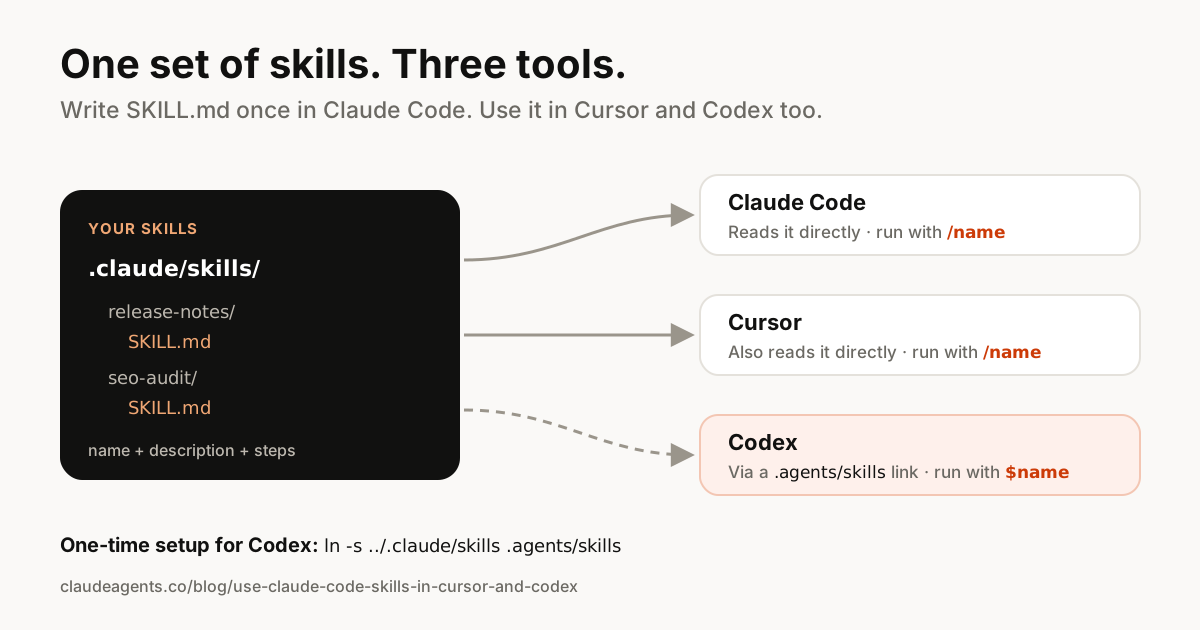
Yes, the same skills work in Claude Code, Cursor and OpenAI Codex. All three read the open Agent Skills format: a folder with a SKILL.md file. Cursor even reads Claude Code's .claude/skills folder as-is. Codex looks in a different folder, .agents/skills, so it needs one link.
This guide shows where each tool looks for skills, how to share one set between all three, and which parts of a Claude Code skill don't carry over. Facts come from the Claude Code, Cursor and Codex docs, checked on 19 November 2026.
Where Claude Code, Cursor and Codex look for skills
Each tool has its own folder, but the overlap is bigger than most people expect.
| Tool | Project skills | Personal skills | Run one by hand |
|---|---|---|---|
| Claude Code | .claude/skills/ | ~/.claude/skills/ | /skill-name |
| Cursor | .cursor/skills/, .agents/skills/, and also .claude/skills/ | ~/.cursor/skills/, ~/.agents/skills/, and also ~/.claude/skills/ | /skill-name in Agent chat |
| Codex | .agents/skills/ (from your folder up to the repo root) | ~/.agents/skills/ | $skill-name, or pick from /skills |
All three can also start a skill on their own when your request matches its description.
So the simplest setup is to keep every skill in Claude Code's .claude/skills/ folder, which Cursor already reads, and give Codex a link to it.
Use your Claude Code skills in Cursor
There's nothing to set up. Cursor's docs say it loads skills from Claude and Codex folders "for compatibility", including .claude/skills/ in your project and ~/.claude/skills/ in your home folder.
Open the project in Cursor, start an Agent chat and type /: your skills appear in the list. Cursor's agent also picks a skill on its own when your request matches its description.
- Name must match the folder. Cursor requires
nameto use lowercase letters, numbers and hyphens, and to match the skill's folder name. A skill in.claude/skills/release-notes/needsname: release-notes. - Scripts and references work. Files in a skill's
scripts/,references/orassets/folders can be used, the same as in Claude Code. - Run only on request.
disable-model-invocation: trueworks in Cursor too: the skill only runs when you type its/name.
Use your Claude Code skills in Codex
OpenAI Codex reads skills from .agents/skills/ in your project (checking every folder from where you start Codex up to the repo root) and from ~/.agents/skills/ for you. Its docs don't list .claude/skills/, so Codex won't find your Claude Code skills on its own.
Codex follows symlinked skill folders, so one link fixes it without copying anything. Run this once in your project:
# In your project folder (macOS or Linux)
mkdir -p .agents
ln -s ../.claude/skills .agents/skills

# Your personal skills, for every project
mkdir -p ~/.agents
ln -s ~/.claude/skills ~/.agents/skills
Now Codex lists the same skills. Type $ and the skill name to run one, use /skills to browse them, or just ask and let Codex pick. Edit a skill once in .claude/skills/ and every tool sees the change. If a new skill doesn't appear, restart Codex.
On Windows, copy the skills folder into .agents\ instead, or create the link with mklink /D .agents\skills ..\.claude\skills in a terminal with permission to make links.
Write skills that work in all three tools
The core format is shared, but each tool adds its own extras. A skill that sticks to the shared parts works everywhere:
- Use `name` and `description` only in the header for skills you want to share. Both are required in Cursor and Codex.
- Write the description as "when to use me". All three tools decide when to load a skill from it, so put trigger words first.
- Keep instructions plain. Numbered steps, checklists and examples work in every tool.
- Avoid Claude Code-only features in shared skills:
context: fork,agent,modeland$ARGUMENTSplaceholders are Claude Code features that Cursor and Codex don't document. - Codex extras go in a separate file. Codex-only settings live in
agents/openai.yamlinside the skill folder, so they don't get in the way of the other tools.
---
name: release-notes
description: Write release notes from recent commits in our house style. Use when asked for release notes, a changelog or "what changed".
---

# Release notes

1. Read the commits since the last tag.
2. Group them: New, Improved, Fixed. Skip chores and merges.
3. One line per change, written for users.
4. End with upgrade steps if anything breaks.
What doesn't carry over from Claude Code
Skills are the shared part. The rest of a Claude Code setup stays in Claude Code:
- Subagents in
.claude/agents/: separate assistants with their own context. Neither Cursor's nor Codex's skills docs mention reading them. See subagents vs skills vs slash commands. - Old command files in
.claude/commands/: move any you want to share into a skill folder (.claude/commands/deploy.mdbecomes.claude/skills/deploy/SKILL.md). - CLAUDE.md: Claude Code's project memory. Codex reads
AGENTS.mdinstead, and Cursor has its own rules. Many teams keep one file and point the others to it. - Hooks, permissions and MCP settings in
.claude/settings.json.
Get 52 ready-made skills
Writing good skills takes time. claudeagents includes 52 skills for coding, SEO and marketing, from on-page-audit-checklist to landing-page-conversion-framework, plus 85 agents and 53 commands that use them in Claude Code. The skills are plain SKILL.md files, so with the link above they work in Cursor and Codex too.
Frequently asked questions
Can I use Claude Code skills in Cursor?
Yes. Cursor loads skills from .claude/skills/ in your project and ~/.claude/skills/ in your home folder for compatibility, so your Claude Code skills appear in Cursor's Agent chat without any setup. The skill's name must match its folder name.
Does OpenAI Codex read .claude/skills?
Not according to its docs. Codex reads skills from .agents/skills/ in your repo and ~/.agents/skills/ for your user. Link .agents/skills to .claude/skills (Codex follows symlinked skill folders) and it will find your Claude Code skills.
Is SKILL.md the same format in every tool?
The core is the same: a folder with a SKILL.md file whose header has a name and a description, then instructions. It's the open Agent Skills standard. Each tool adds optional extras that the others ignore.
Do Claude Code subagents work in Cursor or Codex?
No. Subagents in .claude/agents/ are a Claude Code feature, and the Cursor and Codex skills docs don't mention reading them. Only skills are shared between the tools.
How do I run a skill by hand in each tool?
In Claude Code and Cursor, type /skill-name. In Codex, type $skill-name or browse with /skills. All three can also choose a skill on their own when your request matches its description.
Sources
Skip the setup: get 85 ready-made agents
Coding, SEO and marketing kits for Claude Code, with 52 skills and 53 slash commands. $29 one-time, lifetime updates.
See what's included →