Claude Code Skills for SEO: 8 Skills Worth Having (and a Free One to Copy)
By Shubhranshu, creator of claudeagents · Last reviewed
A Claude Code skill is a SKILL.md file of instructions that Claude loads when your request matches it. For SEO, that means your audit checklist, your title formulas or your content brief template stop living in your head (or a long prompt you paste every time) and become something Claude follows the same way on every page.
This guide explains how skills work, the 8 SEO skills worth having, and how to chain them into a workflow. It ends with a complete on-page SEO audit skill you can copy into your project today. Skill details come from Anthropic's skills documentation, checked on 17 November 2026.
What is a Claude Code skill (and why it beats a prompt for SEO)?
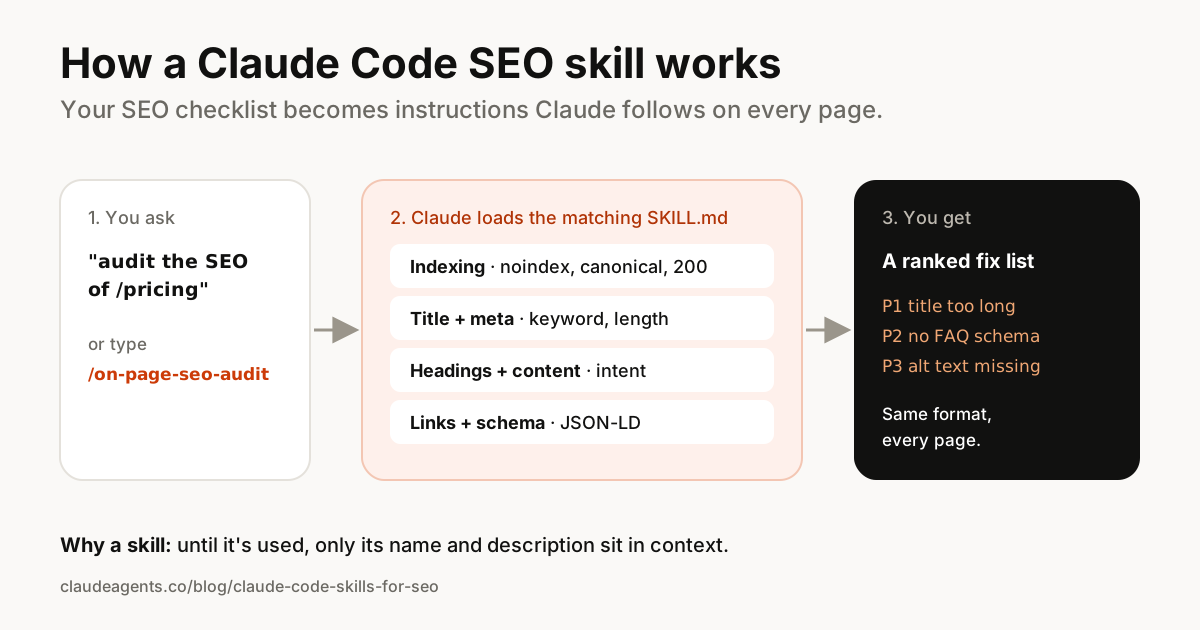
A skill is a folder containing a SKILL.md file: a short header (frontmatter) with a name and a description, followed by the instructions themselves. In every session Claude only sees the list of skill names and descriptions. When you ask for something that matches a description, such as "audit the SEO of /pricing", Claude loads that skill's full instructions and follows them.
For SEO this matters for three reasons:
- Consistency: every page gets the same checks in the same order, so audits are comparable week to week.
- Less context used: a 300-line checklist in
CLAUDE.mdis sent with every message. In a skill, it's only loaded when you audit something. See how to save tokens. - Shareable: commit
.claude/skills/and everyone on the team, or every client project, gets the same process.
Skills replaced the older custom slash commands: a file in .claude/commands/ still works, but skills add supporting files and automatic loading. Our skills guide and skills vs subagents vs commands cover the general picture; this post is about SEO.
How to add an SEO skill to Claude Code
- In your website's project folder, create
.claude/skills/on-page-seo-audit/(use~/.claude/skills/instead if you want it in every project). - Inside it, create
SKILL.mdwith aname, a cleardescriptionof when to use it, and the instructions. - Optional: add supporting files next to it, such as
title-examples.md, and mention them inSKILL.mdso Claude reads them only when needed. - Start Claude Code in the project (
claude) and type/to check the skill appears, or just ask "audit the SEO of https://yoursite.com/pricing". - Edit the skill whenever your process changes. Claude Code picks up edits to skill folders during the session, no restart needed.
your-site/
├── CLAUDE.md
└── .claude/
    └── skills/
        ├── on-page-seo-audit/
        │   └── SKILL.md
        ├── title-tag-formulas/
        │   └── SKILL.md
        └── schema-library/
            ├── SKILL.md
            └── templates.md
Two frontmatter settings are useful for SEO skills. disable-model-invocation: true means a skill only runs when you type its /name, which is good for heavy, multi-page audits. allowed-tools lets a skill use tools like WebFetch without asking you each time.
The 8 Claude Code skills for SEO worth having
These cover the work most sites repeat every week. Each one describes what the skill should contain and a request that would trigger it.
1. On-page audit checklist
Checks one page against a fixed list: indexing, title, meta description, H1 and headings, content depth, internal links, images, structured data and mobile basics. The output is a table of problems ranked by priority with the exact fix for each. Trigger: "audit the SEO of /blog/my-post". A full version is free below.
2. Keyword cluster builder
Turns a raw list of keywords into groups, one group per page, using the rule that keywords whose top results overlap belong on the same page. It outputs a page map: URL, primary keyword, secondary keywords and intent. Trigger: "cluster these 60 keywords into pages".
3. Search intent framework
Classifies a keyword as informational, commercial, transactional or navigational, and says what kind of page ranks: guide, list, comparison, tool or product page. It stops you writing a blog post for a keyword where Google shows product pages. Trigger: "what page should I make for 'claude code pricing'?"
4. Title tag formulas
Holds 10–20 title patterns that work for your site ("<Keyword>: <Benefit> (2026)", "<Number> <Things> for <Audience>") and the rules: keyword near the start, describe the page honestly, unique per page. Google may rewrite titles that don't match the page, so the skill should check the title against the H1 and content.
5. Meta description framework
Writes descriptions that summarise the page and give a reason to click, kept short enough not to be cut off (Google often shows about 150–160 characters, though there's no fixed limit). Include a rule to write a unique description per page and to avoid stuffing keywords.
6. Schema library (JSON-LD)
Stores tested JSON-LD templates for the page types you use, such as Article, FAQPage, Product, Organization and BreadcrumbList, plus the rule that structured data must match what's visible on the page. Put the templates in a supporting file so they only load when needed. Trigger: "add FAQ schema to /pricing".
7. Internal linking playbook
Finds pages on your site that should link to a target page, suggests the anchor text and the exact sentence to place the link in, and checks that important pages aren't orphaned. It works best when Claude can read your content files or sitemap. Trigger: "which pages should link to my new pricing guide?"
8. Content brief template
Produces a writer-ready brief: target keyword and intent, the questions to answer (from People Also Ask and competitors), a suggested H2/H3 outline, what the top results miss, internal links to include and a word-count range. Trigger: "write a brief for 'claude code skills for seo'". Pair it with a writing skill or agent for the draft.
If you'd rather not write these yourself, the claudeagents SEO kit includes all eight as ready-made skills (plus 28 SEO agents and 15 commands such as /seo-audit and /content-brief) that you can read and edit in your .claude folder.
Free skill: copy this on-page SEO audit
Save this as .claude/skills/on-page-seo-audit/SKILL.md in your website project. Then ask Claude Code to "audit the SEO of" any URL or page file, or type /on-page-seo-audit https://yoursite.com/page.
---
name: on-page-seo-audit
description: Audit one web page for on-page SEO - title, meta description, headings, content, internal links, images, structured data and indexability - and return a prioritised fix list. Use when asked to audit, review or improve the SEO of a URL or a page file.
allowed-tools: WebFetch, Read, Grep, Glob
---

# On-page SEO audit

## Steps
1. Get the page: fetch the URL with WebFetch, or read the page file in this project.
2. Note the target keyword. If none is given, infer it from the title and H1 and say so.
3. Check every item in the checklist below. Mark each PASS, FAIL or N/A with the evidence.
4. Rank the fails: P1 blocks ranking or indexing, P2 weakens relevance, P3 is polish.
5. For each fail, write the exact fix (new title text, new H2, code to add).

## Checklist
| Area | Check |
|---|---|
| Indexing | No noindex, canonical points to itself, page returns 200 |
| Title | Contains the keyword near the start, describes the page, unique, not cut off (aim for about 50-60 characters) |
| Meta description | Summarises the page and gives a reason to click (often shown up to about 155 characters) |
| H1 | Exactly one, matches the search intent |
| Headings | H2/H3 cover the questions searchers ask, in a logical order |
| Content | Answers the main question in the first paragraph, covers what top results cover, adds something they don't |
| Internal links | Links to 2-4 related pages, and important pages link to this one |
| Images | Descriptive alt text, compressed, width and height set |
| Structured data | Valid JSON-LD for the page type (Article, Product, FAQPage...) |
| Mobile and speed | Readable on a phone, no layout shift from late-loading elements |

## Output format
### On-page audit: <url>
Target keyword: <keyword> (given / inferred)
| Priority | Area | Problem | Fix |
|---|---|---|---|

### Top 3 fixes to make today
1. ...

## Rules
- Quote the current text before suggesting new text.
- Never invent search volumes or rankings; say "check in Search Console" instead.
Change the checklist to match how you work: add your brand rules, remove checks that don't apply, or add a supporting file with examples of titles you like. The more specific the skill, the more consistent the audits.
Chain skills into a weekly SEO workflow
Skills are most useful when each step's output feeds the next. A simple weekly loop for one new page and one refresh:
- Pick the keyword: ask Claude to use the search intent skill on 3–5 candidates and choose the one your site can win.
- Brief it: run the content brief skill on the chosen keyword.
- Draft and check: write the page, then run the title, meta description and schema skills on it.
- Link it: run the internal linking skill so 2–3 existing pages link to the new one.
- Refresh an old page: run the on-page audit skill on a page ranking in positions 8–20 in Search Console and apply the top 3 fixes.
To run several skills at once, wrap them in a custom command or a subagent: for example an /seo-audit command that runs the audit, builds a keyword cluster and writes a brief in one go. That's how the commands in our kit are built.
Tips for writing SEO skills that trigger reliably
- Write the description for the trigger, not the reader: say what the skill does and when to use it, with the words you'd actually type ("audit", "title tag", "schema").
- One job per skill: a skill that audits, writes and links is hard for Claude to match. Split it.
- Keep `SKILL.md` short: Anthropic suggests under about 500 lines. Move long template lists to supporting files.
- Fix the output format: a table with the same columns every time makes audits easy to compare and paste into tickets.
- Ban made-up numbers: tell the skill never to invent search volumes, rankings or traffic; it should point you to Search Console or a keyword tool instead.
Common mistakes
- Putting the checklist in CLAUDE.md: it's then sent with every message, even when you're not doing SEO. Use a skill.
- Vague descriptions: "SEO helper" rarely triggers. "Audit one page for on-page SEO and return a prioritised fix list" does.
- No examples: a short example of a good title or a good brief section improves results more than more rules.
- Trusting it blindly: skills follow your checklist, but they can't see your Search Console data unless you give it to them. Check the fixes against real performance.
Frequently asked questions
What are Claude Code skills for SEO?
They're SKILL.md files that hold your SEO processes, such as an on-page audit checklist, title tag formulas or a content brief template. Claude Code loads one when your request matches its description, or when you run it with /skill-name, and follows it the same way every time.
Where do I put a Claude Code skill?
In .claude/skills/<skill-name>/SKILL.md inside your project to use it there (and share it via Git), or in ~/.claude/skills/<skill-name>/SKILL.md to use it in every project on your computer.
Do skills use a lot of tokens?
No. Until a skill is used, only its name and description are in context. The full instructions load when it's invoked, which is why skills are better than putting long SEO checklists in CLAUDE.md.
Can a Claude Code skill check a live website?
Yes, if the skill can use web tools. Give it WebFetch (for example with allowed-tools in the frontmatter) and it can fetch a URL and audit the HTML. It can't see your Search Console or analytics data unless you export it into the project or connect a tool for it.
Skills, subagents or commands: which should I use for SEO?
Use skills for repeatable checklists and templates, subagents for bigger jobs that should run in their own context (like auditing a whole site), and a command to run several of them in a set order, such as /seo-audit.
Sources
Skip the setup: get 85 ready-made agents
Coding, SEO and marketing kits for Claude Code, with 52 skills and 53 slash commands. $29 one-time, lifetime updates.
See what's included →