Claude Code Review: Which Command Should You Use Before You Push?
By Shubhranshu, creator of claudeagents · Last reviewed
For most changes, run /code-review before you push. Add /security-review when the change touches logins, payments, permissions or user input. Save /code-review ultra for big or risky merges, because it can cost money. And /review is not a separate tool: it's another name for /code-review.
The names are confusing, and they have changed, so older guides disagree with each other. This one is checked against Anthropic's docs on 22 November 2026.
You'll also get a reviewer subagent to copy and a small test file with eight planted bugs, so you can see for yourself what a review catches on your setup.
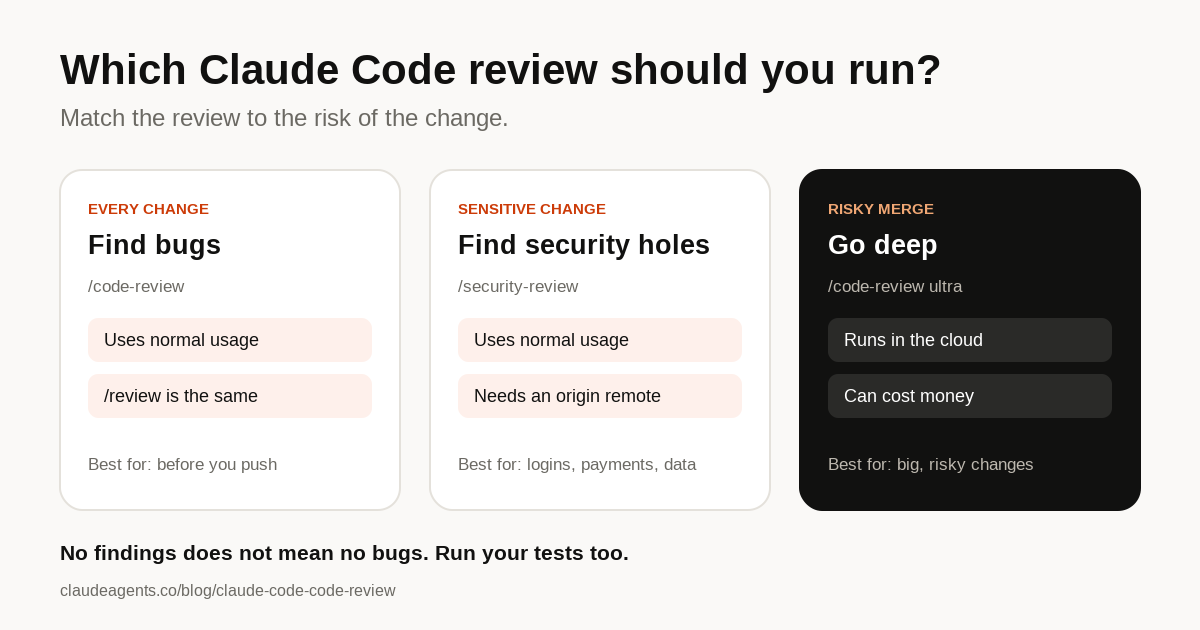
Claude Code review commands at a glance
| Option | What it's for | Where it runs | Cost |
|---|---|---|---|
| /code-review or /review | Bugs in your changes | Your session | Normal usage |
| /security-review | Security holes in your branch | Your session | Normal usage |
| /code-review ultra | A deep check before a risky merge | Anthropic's cloud | 3 free runs on Pro, Max and Ultra, then usage credits |
| Code Review for GitHub | Pull requests across a team | Anthropic's cloud | Usage credits (Team and Enterprise only) |
| Your own subagent | Your project's own rules | Your session | Normal usage |
| /simplify | Cleanup, not bug finding | Your session | Normal usage |
/code-review: the everyday bug check
/code-review reads the changes on your branch, including uncommitted ones, and reports correctness bugs: code that does the wrong thing. Depending on your model and effort level, it can suggest cleanups too.
In the terminal it runs in the background with its own context, so you can keep working. You can point it at something else or change how hard it looks:
# Your branch and uncommitted changes
/code-review

# Fewer findings, higher confidence
/code-review low

# Wider coverage
/code-review high

# A pull request, or just one folder
/code-review 1234
/code-review src/auth

# Review, then apply the fixes
/code-review --fix
The levels are low, medium, high, xhigh and max. Low reports only what it's most sure of. Higher levels cover more and may include findings that turn out to be wrong. If you don't type a level, it reuses the last one you typed, even from an earlier session.
Be careful with --fix: edits from a background review aren't fully undone by /rewind. Commit first, so Git can undo them.
/review vs /code-review: is there a difference?
No. In current Claude Code, /review is an alias, so it takes the same levels, flags and targets. If a guide describes them as two tools, it was probably written for an older version.
There's one exception. If you create your own skill named code-review, it replaces /code-review, while /review still runs the built-in one.
Another old name to watch: before version 2.1.147, the bug-finding command was called /simplify. Today /simplify only does cleanup.
/security-review: when a mistake is dangerous
/security-review has a narrower job. It reads the difference between your branch and origin's default branch and looks for risks such as injection, broken login or permission checks, and exposed data.
Run it as well as /code-review, not instead of it. A discount that makes a price negative is a bug you want found, but it isn't what a security review is looking for. Use it whenever you change:
- login, sessions, roles or who can see what
- payments, refunds or webhooks
- database queries, file uploads or downloads
- anything that handles input from a user
If it fails with an ambiguous argument error, Git probably doesn't know origin's default branch. Run git remote set-head origin --auto and try again.
/code-review ultra: the deep, paid review
Ultra sends the review to a cloud sandbox where several agents hunt for bugs, and each finding is reproduced and checked before you see it. It's a research preview, so details can change.
- Free runs: Pro, Max and Ultra plans get three. They don't refresh, and a run you stop early still counts.
- After that: typically $5 to $25 per review in usage credits. You see the estimate before it starts.
- Sign-in: you need a claude.ai account. An API key alone won't work.
- Privacy: reviewing a local branch uploads your repository to Anthropic's cloud sandbox, so check you're allowed to do that with client code.
Automatic reviews on GitHub
Code Review for GitHub is a different product with a similar name. An organization owner on a Team or Enterprise plan turns it on, and Claude then comments on pull requests. It's billed separately from the plan's included usage.
Check the trigger when you set it up. New repositories default to reviewing after every push, which costs the most. You can switch to once per pull request, or only when someone comments @claude review. It never approves or blocks a merge.
A free code reviewer subagent to copy
The built-in commands don't know which of your rules matter most. A subagent lets you write them down. Save this in your project, change origin/main if your branch has another name, and add your own rules to step 3.
---
name: pre-push-reviewer
description: Reviews changes for bugs and security problems before a push. Use when asked for a pre-push review.
tools: Read, Grep, Glob, Bash
---

You review code changes before they are pushed. You never edit files.

1. Read README.md and CLAUDE.md, if present, to learn the project's rules.
2. Run `git diff origin/main` to get the changes, then read each changed file in full.
3. Check every change for:
   - broken project rules
   - missing login, ownership or role checks
   - user input reaching SQL, file paths, shell commands or HTML
   - wrong results at the edges: zero, negative, first page, empty, very large
   - async calls that are not awaited
4. For each finding give: file and line, the input that triggers it, what
   goes wrong, and the smallest fix.
5. Report only problems you can explain with a concrete input. Put the most
   severe first. If you find nothing, say so and list what you checked.
Then ask: "Use the pre-push-reviewer subagent on my changes." It has no Edit or Write tool. Bash can still change files, so keep permission prompts on and only approve the Git commands it needs.
Test your review on 8 planted bugs
A review that says "no issues" only means something if you know what it can catch. This throwaway project gives you a known answer. It creates a local origin, so nothing goes to GitHub.
mkdir review-test && cd review-test
git init --bare origin.git
git --git-dir=origin.git symbolic-ref HEAD refs/heads/main
git init -b main shop && cd shop

cat > README.md <<'EOF'
Customers can only see their own orders.
Only admins can issue refunds.
Pages start at 1.
Discounts are percentages from 0 to 100.
EOF

echo '{ "type": "module" }' > package.json
git add . && git commit -m "Project rules"
git remote add origin ../origin.git
git push -u origin main
git remote set-head origin main
git checkout -b orders
The file with the bugs
Save this as orders.js in the shop folder and commit it on the orders branch. Never use it in a real app.
import { readFile } from "node:fs/promises";
import path from "node:path";

const PAGE_SIZE = 20;

export async function searchOrders(db, req) {
  const term = req.query.q ?? "";
  return db.all(
    `SELECT * FROM orders WHERE user_id = ? AND item LIKE '%${term}%'`,
    [req.user.id],
  );
}

export async function getOrder(db, req) {
  return db.get("SELECT * FROM orders WHERE id = ?", [req.params.id]);
}

export async function listOrders(db, req) {
  const page = Math.max(1, Math.trunc(Number(req.query.page)) || 1);
  return db.all(
    "SELECT * FROM orders WHERE user_id = ? ORDER BY id LIMIT ? OFFSET ?",
    [req.user.id, PAGE_SIZE, page * PAGE_SIZE],
  );
}

export async function getInvoice(req) {
  return readFile(path.join("invoices", req.query.file));
}

export async function refundOrder(db, payments, req) {
  const order = await db.get(
    "SELECT * FROM orders WHERE id = ? AND status = 'paid'",
    [req.params.id],
  );
  if (!order) return { ok: false };
  payments.refund(order.payment_id);
  await db.run("UPDATE orders SET status = 'refunded' WHERE id = ?", [order.id]);
  return { ok: true };
}

export function applyDiscount(price, percent) {
  return price - price * (percent / 100);
}

export function cheapestFirst(prices) {
  return [...prices].sort();
}
Now run /code-review, /security-review and your subagent, each in a fresh session, so one review can't read another's answers. Note what each one found before you read on.
The answer key
We ran the file to confirm that all eight bugs are real. Four are security problems and four are logic bugs.
| Function | Type | What goes wrong | Fix |
|---|---|---|---|
| searchOrders | Security | Search text is pasted into SQL | Pass it as a parameter |
| getOrder | Security | Any customer can read any order | Also match on user_id |
| getInvoice | Security | ../ reads files outside invoices | Check the resolved path and the owner |
| refundOrder (who) | Security | Customers can issue refunds | Require an admin |
| refundOrder (timing) | Logic | Marked refunded before the payment finishes | Await the refund |
| listOrders | Logic | Page 1 skips the first 20 orders | Use (page - 1) × PAGE_SIZE |
| applyDiscount | Logic | 150% off $50 gives -$25 | Allow only 0 to 100 |
| cheapestFirst | Logic | 100, 9, 20 sorts to 100, 20, 9 | Sort with (a, b) => a - b |
Score each reviewer out of eight and count its false alarms too. Expect the score to change with the model, the effort level and even between two runs. This file is also small and easy, so a perfect score here doesn't prove your real code is safe.
A checklist before you push
- Commit your work, so any fix can be undone.
- Read the change yourself with
/diff. - Run your tests, then use the app. A local review mostly reads code, so it can miss what only breaks when running.
- Run
/code-review. - If it touches money, accounts, data or user input, run
/security-review. - Fix what's real, then run the tests again.
- For a big or risky merge, consider
/code-review ultra.
Want more of this set up for you? The claudeagents coding kit includes agents such as a debugger, a bug reproducer and a secrets checker, plus /security-check and /launch-checklist for the last look before launch. The SEO and marketing kits come in the same purchase.
Frequently asked questions
Is Claude Code review free?
/code-review works on any plan that includes Claude Code and counts toward your normal usage or API bill. Ultra and the managed GitHub service are billed through usage credits, apart from ultra's three one-time free runs on Pro, Max and Ultra.
Is there a Claude Code review skill or plugin?
You don't need to install one. /code-review is a skill bundled with Claude Code. For your own rules, add them to CLAUDE.md, write a review skill, or copy the reviewer subagent in this guide.
Can Claude Code review a pull request?
Yes. Run /code-review followed by the pull request number, for example /code-review 1234. Add --comment to post the findings on the pull request.
Can it fix the bugs it finds?
Yes. Add --fix, or ask Claude to fix specific findings afterwards. Commit first and read the edits before you push them.
Does /code-review read REVIEW.md?
No. The local command follows your CLAUDE.md. REVIEW.md configures the managed Code Review service for GitHub.
Does an AI review replace a human review?
No. Anthropic's docs say a review with no findings doesn't mean your code is free of errors or secure. Use it to catch problems early and keep a person responsible for the merge.
Sources
Skip the setup: get 85 ready-made agents
Coding, SEO and marketing kits for Claude Code, with 52 skills and 53 slash commands. $29 one-time, lifetime updates.
See what's included →