How to Write Tests with Claude Code (A Simple TDD Workflow)
By Shubhranshu, creator of claudeagents · Last reviewed
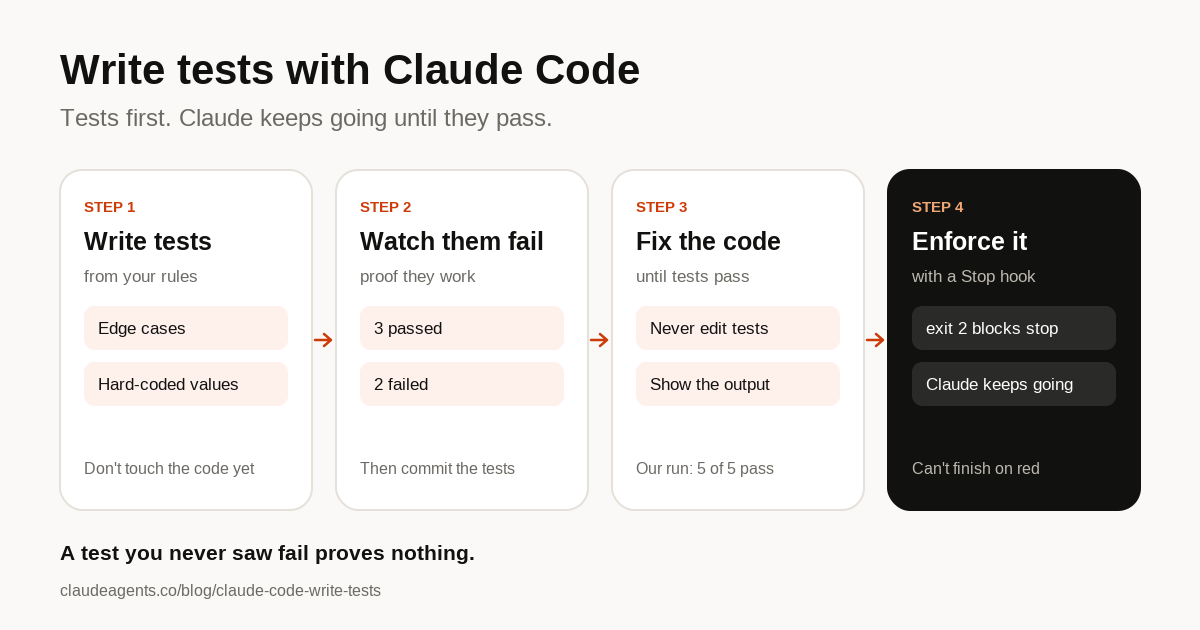
The best way to write tests with Claude Code is test-first: ask Claude to write tests from your rules, run them and watch them fail, then let it write the code until they pass, without ever editing the tests. Tests give Claude something it can run that says pass or fail. With that, it can check and fix its own work instead of telling you it's done.
Below is the whole workflow on a small, real example, plus the CLAUDE.md lines, hook and test-writer agent that make it automatic.
Why tests matter more when Claude writes the code
Claude writes code fast, and it sounds sure of itself either way. A test is the one thing that doesn't care how confident it sounds. The Claude Code best practices put it simply: give Claude something it can run that comes back pass or fail, and it can keep going on its own.
That changes what you review. You stop reading every line to check whether it works. You read the tests to check that they test the right things, and let the test run tell you if the code does.
Step 1: tell Claude how to run your tests
Add a short tests section to your CLAUDE.md. The docs recommend putting the exact test command there, plus how to run a single test file. Running one file is faster and keeps the output short.
## Tests
- Run all tests: npm test
- Run one file: node --test path/to/file.test.js
- New tests go next to the code: cart.js → cart.test.js
- Never edit a test to make it pass. Ask first.
- Never mock the function under test.
The last two lines stop the two worst habits AI test-writers have: changing the test when the code fails, and mocking the very thing being tested. Need a starting CLAUDE.md? Use our CLAUDE.md template.
Step 2: write the tests first (a real example)
Here's a small function with a rule written in its comment: the coupon is a percentage from 0 to 100. Nothing in the code checks that rule.
// Returns the cart total in cents.
// coupon is a percentage from 0 to 100.
export function cartTotal(items, coupon = 0) {
  let total = 0;
  for (const item of items) {
    total += item.price * item.qty;
  }
  return Math.round(total - total * coupon / 100);
}
Ask Claude for tests before touching the code. Naming the edge cases yourself gets much better tests than "add tests".
Step 3: watch the tests fail
Paste this into Claude Code:
Read cart.js and README.md.

Write tests in cart.test.js for cartTotal using node:test.
Cover the rules in README.md and the edge cases: empty cart,
coupon of 0 and 100, coupon over 100, negative quantity.

Don't change cart.js yet. Run the tests, show me the command
and its output, and tell me which tests fail and why.
What the first test run showed
When we ran these five tests against the code above, three passed and two failed:
$ node --test
✔ adds price times quantity
✔ empty cart is 0
✔ applies a percentage coupon
✖ rejects a coupon over 100
✖ rejects a negative quantity
ℹ tests 5
ℹ pass 3
ℹ fail 2
Those two failures are the point. The code accepts a coupon of 150% and a quantity of -1 without complaint, which in a real shop means negative totals. The failing tests prove the tests can catch the bug. A test you never saw fail might not be testing anything.
Commit the tests now, before any fix. If Claude later changes them, git diff shows it straight away.
Step 4: let Claude fix the code until the tests pass
Now fix cart.js so every test passes.

Don't edit cart.test.js. If you think a test is wrong,
stop and tell me instead of changing it.

Run node --test when you're done and show me the output.
In our run, the fix was two lines: throw a RangeError when the coupon is outside 0 to 100, and when a quantity is negative. The rerun showed 5 tests, 5 passed, 0 failed.
"Stop and tell me instead of changing it" matters. Sometimes the test really is wrong, and you want to make that call, not have it made quietly.
How to spot weak tests Claude writes
Passing tests aren't automatically good tests. Read them for these patterns:
| Weak test | Why it's weak | Ask for this instead |
|---|---|---|
| Expected value computed with the same formula as the code | If the formula is wrong, the test is wrong too | Hard-coded expected values, like 900 |
| The function under test is mocked | It tests the mock, not your code | Mock only slow or outside things, like the network |
| Only checks that nothing throws | Almost any code passes | Check the actual result |
| Only the happy path | Bugs live at the edges | Empty, zero, limits and bad input |
| One giant test for everything | A failure doesn't tell you what broke | One behavior per test |
Make it automatic with a Stop hook
Prompts are requests. Hooks are rules Claude Code enforces. A Stop hook runs when Claude tries to finish, and exit code 2 blocks the stop, so Claude has to keep working. The docs show this pattern with a typecheck. Here it is with tests, in .claude/settings.json:
{
  "hooks": {
    "Stop": [
      {
        "hooks": [
          { "type": "command", "command": "npm test 1>&2 || exit 2" }
        ]
      }
    ]
  }
}
1>&2 sends the test output to Claude so it can see what failed. Use this when your test suite runs in seconds. For slow suites, run one test file instead, or Claude will wait on the full suite at every stop. More patterns are in our Claude Code hooks guide.
Use a test-writer subagent
A subagent is a separate Claude with its own instructions and tools. A test-writer that can only edit test files is a good one to have, especially before a refactor. Save this as .claude/agents/test-writer.md:
---
name: test-writer
description: Writes tests for existing code before it changes. Use when asked to add tests or before a refactor.
tools: Read, Grep, Glob, Write, Bash
---

You write tests. You never edit code that isn't a test file.

1. Read CLAUDE.md for the test command and where tests go.
2. Read the code under test and one existing test file to copy its style.
3. Write tests for: the normal case, empty input, the limits,
   bad input, and every rule written in comments or the README.
4. Each test checks one behavior, with a hard-coded expected value.
   Never compute the expected value with the same logic as the code.
5. Run the tests and report the command, the output and which fail.
Then ask: "use the test-writer agent to add tests for src/billing before I refactor it". Step-by-step setup is in how to create Claude Code subagents.
Tests catch what you thought to test. For what you didn't, run a review before pushing: see /code-review vs /security-review.
Ready-made agents for debugging
Tests tell you something broke. Finding why is the next job. The claudeagents coding kit includes 30 agents for Claude Code, including a bug reproducer and a debugger that work as a team, so you don't write each one from scratch.
Frequently asked questions
Can Claude Code write unit tests?
Yes. Ask it to read the code and one existing test file, then write tests in the same style. Name the edge cases you care about. That gives much better tests than a bare "add tests".
Can Claude Code run my tests?
Yes, it runs them in your terminal like you would. Put the exact test command in CLAUDE.md so it doesn't have to guess.
Does Claude Code do test-driven development?
It works well with it. Ask for tests first, check that they fail, commit them, then ask for code that makes them pass without editing the tests.
Why does Claude change my tests?
When code fails, changing the test is the shortest path to green. Forbid it in CLAUDE.md and in the prompt, commit tests before the fix, and check git diff afterwards.
Which test framework works with Claude Code?
Any one you can run from the terminal: Jest, Vitest, pytest, Go's testing package, Node's built-in test runner and others. Claude follows whatever your project already uses.
Sources
Skip the setup: get 85 ready-made agents
Coding, SEO and marketing kits for Claude Code, with 52 skills and 53 slash commands. $29 one-time, lifetime updates.
See what's included →