How to Use Claude Code for Job Applications: A Complete 2026 Guide
By Shubhranshu, creator of claudeagents · Last reviewed
Using Claude Code for job applications means keeping your whole job search in one folder on your computer and letting Claude Code do the repetitive work: tailoring your resume to each posting, drafting cover letters, researching companies, tracking every application and preparing you for interviews. You stay in charge of every word that goes out.
A normal chat with an AI forgets you between conversations, so you paste your resume again and again and get generic answers. Claude Code works on real files. It reads your resume, a job posting and your notes, writes new versions next to them, and follows the same rules every time because those rules live in a file called CLAUDE.md.
This guide walks through the full setup, step by step. You don't need to be a developer: every command and file is ready to copy, and you can use the Claude Code desktop app instead of the terminal if you prefer.
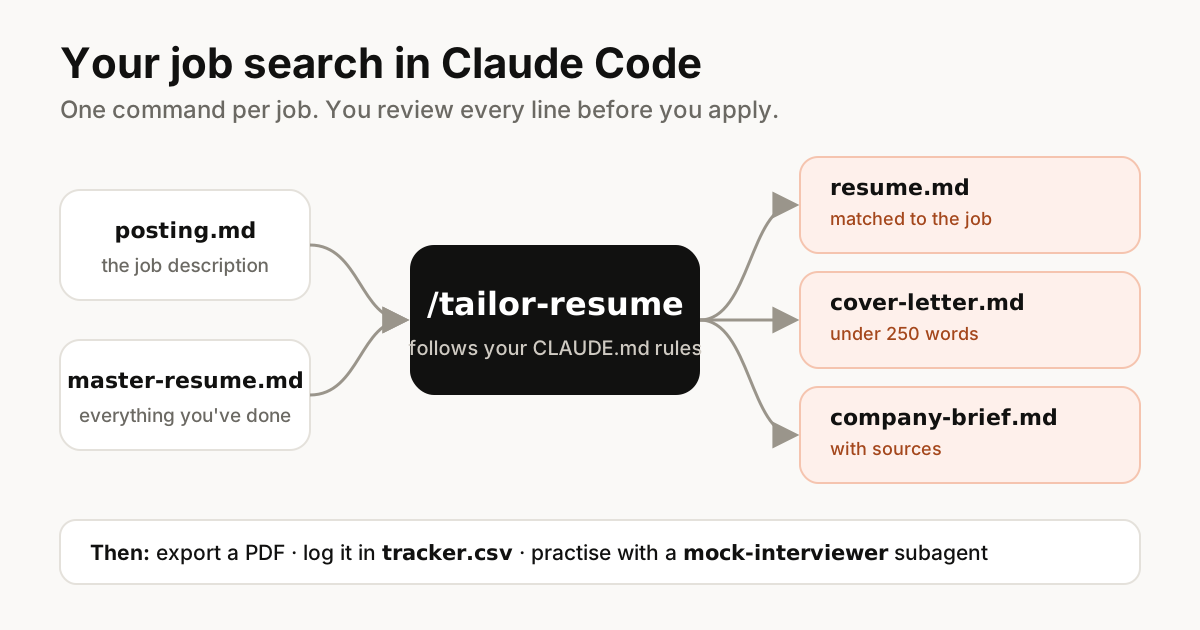
Why use Claude Code for a job search instead of ChatGPT
Chat assistants are fine for a one-off cover letter. A job search is different: it's dozens of applications over weeks, and each one needs the same facts about you, adjusted to a different posting. That's exactly the kind of repeatable work Claude Code is good at.
- It remembers your rules. CLAUDE.md is loaded at the start of every session, so your career facts, tone and "never exaggerate" rule apply to every document without pasting them again.
- It works with real files. It reads your old resume PDF, the job posting and your notes, and writes Markdown files you can edit, compare and export.
- One command does the whole routine. A skill like /tailor-resume runs the same steps every time: read the posting, match your experience, write the resume, write the letter, log the application.
- Specialists for specific jobs. A subagent can act as a tough interviewer or a recruiter skimming your resume in six seconds, with its own instructions.
- You keep a history. Every tailored resume is saved per company, so you always know exactly what you sent.
“The goal isn't more applications. It's fewer, better ones, each written for the job in front of you.”
What you need before you start
- A paid Claude plan (Pro or higher) or a Claude Console account with API credits. Claude Code is included in Claude Pro.
- Claude Code installed, or the Claude desktop app if you'd rather not use a terminal. See the setup guide for non-developers.
- Your current resume (PDF or Word), and if you have one, your LinkedIn profile exported as a PDF.
- About an hour for the one-time setup. After that, each application takes a few minutes plus your own review.
curl -fsSL https://claude.ai/install.sh | bashOn Windows PowerShell, run irm https://claude.ai/install.ps1 | iex. Then open a new terminal and run claude --version to check it worked.
Step 1: Create a job-search folder
Everything lives in one folder. Claude Code works best when files have predictable names and places, so set this structure up once.
job-search/
├── CLAUDE.md                 # who you are + rules (Step 2)
├── profile/
│   ├── master-resume.md      # everything you've ever done (Step 3)
│   ├── stories.md            # interview stories (Step 8)
│   └── old-resume.pdf        # your current resume
├── jobs/
│   └── acme-frontend-engineer/
│       ├── posting.md        # the job description you pasted
│       ├── resume.md         # tailored resume
│       ├── cover-letter.md
│       └── company-brief.md
├── tracker.csv               # every application (Step 7)
└── .claude/
    ├── skills/               # your commands (/tailor-resume ...)
    └── agents/               # your specialists (mock interviewer ...)
Open the folder in Claude Code (cd job-search, then claude) and ask it to create the empty folders and files for you. You only need to drop in old-resume.pdf yourself.
Step 2: Write a CLAUDE.md about you
CLAUDE.md is a plain text file that Claude Code reads at the start of every session. For a job search it holds two things: the facts that never change about you, and the rules every document must follow. The most important rule is honesty: Claude should only use experience that's in your master resume.
Keep it short and specific. A long, vague CLAUDE.md is easier to ignore than a short, clear one. Our CLAUDE.md template explains the format in more detail.
# Job search: Priya Sharma

## Me
- Frontend engineer, 5 years. React, TypeScript, Next.js, design systems.
- Based in Bengaluru. Open to remote (EU/US time overlap) or Bengaluru hybrid.
- Target roles: Senior Frontend Engineer, Frontend Lead. Not interested in pure backend.
- Notice period: 30 days.

## Sources of truth
- All experience comes from profile/master-resume.md. Interview stories from profile/stories.md.
- NEVER invent jobs, titles, dates, numbers, degrees or skills. If a posting asks for
  something I don't have, say so in your notes. Don't hide it, don't fake it.

## Writing rules
- Plain, confident English. No "passionate", "synergy", "results-driven", "leverage".
- Resume bullets: action verb + what I did + measurable result. Max 2 lines each.
- Resume: 1 page for roles under 8 years experience. Simple layout, no tables or columns.
- Cover letters: under 250 words, 3 short paragraphs, mention one specific thing about the company.
- Use the posting's own words for skills I really have (e.g. "React" not "React.js" if they say React).

## Files
- Each job gets jobs/<company>-<role>/ with posting.md, resume.md, cover-letter.md, company-brief.md.
- Log every application in tracker.csv.
Step 3: Build a master resume (your experience bank)
A master resume is a long document with everything you've done: every job, project, result, tool and award, including things that don't fit on a one-page resume. You never send it. Every tailored resume is cut from it, which is what keeps Claude Code honest and fast.
Claude Code can read PDF files, so start from what you already have. Then let it interview you to fill the gaps, especially numbers. Recruiters remember "cut page load time from 4.2s to 1.6s", not "improved performance".
Read profile/old-resume.pdf (and profile/linkedin.pdf if it exists).
Create profile/master-resume.md with every role, project, skill and achievement.

Then interview me, one question at a time, to add missing details:
- For each role: what did I ship, what changed because of it, any numbers?
- Tools and skills I used but didn't list.
- Side projects, open source, talks, awards, certifications.
Don't guess any numbers. If I don't know one, write the bullet without it.
Spend real time here. Every hour you put into the master resume saves time on every application after it. Update it whenever you finish a project, not only when you're job hunting.
Step 4: Tailor your resume to each job with one command
This is the core of the setup. A skill is a reusable set of instructions saved as a SKILL.md file. Once it exists, typing /tailor-resume followed by a job folder runs the whole routine: read the posting, pick your most relevant experience, rewrite the bullets in the posting's language and flag any gaps.
First paste the job description into jobs/<company>-<role>/posting.md. Copying the text is more reliable than giving a link, because many job boards hide postings behind logins or block automated reading.
What makes a resume easy for ATS software to read
Most companies use an applicant tracking system (ATS) to collect and search applications. These systems read text, so a simple layout is safer than a designed one. Ask Claude Code to keep the format plain:
- Standard headings: Summary, Experience, Skills, Education.
- One column, no tables, text boxes or icons. Contact details in the body, not in a header or footer.
- Use the same names for skills as the posting does, but only for skills you really have.
- Never add hidden keywords in white text. Recruiters see the plain text, and it looks dishonest.
- Save as PDF unless the posting asks for Word (see Step 9).
---
name: tailor-resume
description: Tailor my resume and cover letter to one job posting. Use when I give a job folder.
disable-model-invocation: true
---

Job folder: $ARGUMENTS

1. Read $ARGUMENTS/posting.md. List the must-have skills, nice-to-haves,
   seniority signals and the 5 words or phrases the posting repeats most.
2. Read profile/master-resume.md. Match each requirement to real experience.
   Make a table: requirement | my evidence | strong / partial / missing.
3. Write $ARGUMENTS/resume.md:
   - Summary (2 lines) aimed at this role.
   - Pick the 10-14 most relevant bullets. Rewrite them using the posting's
     wording only where it's true. Keep every number exactly as in the master.
   - Skills section ordered by what this posting asks for.
   - Follow the resume rules in CLAUDE.md.
4. Write $ARGUMENTS/cover-letter.md following the rules in CLAUDE.md.
5. Write $ARGUMENTS/notes.md with the match table, any missing requirements,
   and 3 questions I could ask in the interview.
6. Add a row to tracker.csv with status "draft" and today's date.
Never invent experience. If a must-have is missing, say so in notes.md.
Run it with /tailor-resume jobs/acme-frontend-engineer. Then read every line. You're the one who'll be asked about it in an interview, so anything you can't talk about confidently should come out.
Step 5: Write cover letters that don't sound like AI
Recruiters read a lot of AI-written cover letters, and they recognise them: long, vague, full of "I am excited to apply". Your CLAUDE.md rules already push against this. Two more habits make the letter sound like you:
- Give Claude Code one real reason you want this job: a product you use, a talk you watched, a problem they're solving. The letter should be built around that, not around adjectives.
- Add a sample of your own writing (an old email or post) to profile/voice.md and add "match the tone of profile/voice.md" to CLAUDE.md.
- Ask for a critique, not just a draft. After the first version, ask: "Mark every sentence that could appear in anyone's cover letter, and rewrite those."
Rewrite jobs/acme-frontend-engineer/cover-letter.md.
Why I want this job: I've used Acme's design tool daily for two years and
their talk on design tokens changed how we built our component library.
Lead with that. Under 220 words. Match the tone of profile/voice.md.
Step 6: Research the company in two minutes
Claude Code can search the web and read public pages. Use it to build a short company brief before you apply and again before each interview. Ask it to cite its sources so you can check anything surprising, because web results can be outdated or wrong.
Research Acme for jobs/acme-frontend-engineer/company-brief.md.
Use their website, engineering blog, recent news and public job posts.
Cover: what they sell and to whom, size and stage, recent launches or funding,
tech stack clues, engineering culture, and anything that worries you.
Keep it to one page. Link every source. Mark anything older than 12 months.
Use the brief for the one specific line in your cover letter, for your questions at the end of the interview, and to decide whether you actually want the job.
Step 7: Track every application in one file
A spreadsheet beats memory. A plain CSV file works well because both you and Claude Code can read and edit it, and you can open it in Excel, Numbers or Google Sheets.
date,company,role,link,status,contact,next_step,next_date,notes
2026-11-15,Acme,Frontend Engineer,https://acme.example/jobs/123,applied,Ravi (recruiter),follow up,2026-11-22,referral from Ana
2026-11-16,Northwind,Senior Frontend,https://northwind.example/careers/88,draft,,send application,2026-11-17,
Once a week, ask: "Read tracker.csv. Who should I follow up with this week? Draft a short, polite follow-up for each one." You can also ask for a summary: how many applications, response rate, and which kinds of roles reply most often. That tells you where to spend your time.
Step 8: Prepare for interviews with a mock-interviewer subagent
Interviews reward preparation, and practising out loud (or in writing) with someone who pushes back is the best preparation. A subagent is a specialist with its own instructions. Make one whose only job is to interview you like the hiring manager for a specific role.
First, build a story bank. Ask Claude Code to turn your master resume into 8 to 10 stories in the STAR format (Situation, Task, Action, Result) and save them in profile/stories.md. Most behavioural questions can be answered with one of those stories.
---
name: mock-interviewer
description: Runs a realistic mock interview for a job folder. Use when I ask to practise an interview.
tools: Read, Write
---

You are the hiring manager for the role in the job folder I name.
Read posting.md, company-brief.md and resume.md in that folder, and profile/stories.md.

- Ask one question at a time. Mix behavioural, role-specific and "why us" questions.
- After each answer, give short feedback: what worked, what was vague,
  and a stronger version using my real stories. Never invent experience.
- Push back like a real interviewer: ask follow-ups on vague answers.
- After 8 questions, write interview-feedback.md in the job folder with my
  3 strongest answers, 3 to improve, and questions I should ask them.
Start it with: "Use the mock-interviewer for jobs/acme-frontend-engineer." For technical roles, also ask for a practice coding or system-design question at the right level, then have Claude Code review your solution like an interviewer would.
Step 9: Export a clean PDF resume
Markdown is great for editing, but you send a PDF. There are three simple ways to convert it, and Claude Code can set up whichever you choose:
- HTML and print to PDF (easiest). Ask Claude Code to turn resume.md into a simple, one-column HTML page with clean typography, then open it in your browser and print to PDF.
- Pandoc. A free command-line converter that turns Markdown into Word (.docx) or PDF. Useful when a company asks for a Word file.
- Typst or LaTeX. For a polished, consistent template you reuse for every job. Claude Code can write the template once and fill it from resume.md each time.
Create templates/resume.html: one column, system font, 11pt, A4,
clear section headings, no icons or colors except one accent for my name.
Then add a step to the tailor-resume skill that renders resume.md into
$ARGUMENTS/resume.html with that template, ready to print to PDF.
Before sending, open the PDF and select all the text. If the text copies cleanly in the right order, an ATS can most likely read it too.
Step 10 (for developers): polish your GitHub and portfolio
If you're applying for engineering roles, your code is part of your application. Claude Code is at home here: point it at your best two or three repositories and ask it to make them easy for a hiring manager to understand in a minute.
- Write a README with a one-line summary, a screenshot, how to run it and what you'd improve next.
- Fix obvious problems a reviewer would notice: failing tests, unused files, secrets in the history, missing licence.
- Build or refresh a simple portfolio site that links to these projects, and deploy it.
- Pin the repositories on your GitHub profile that match the jobs you want.
A weekly job-search routine with Claude Code
Once the setup is done, a sustainable routine looks like this. The point is consistency, not volume.
- Monday: pick 5 to 8 roles you really want. Paste each posting into its own folder.
- Tuesday to Thursday: run /tailor-resume for one or two jobs a day. Review every line, add a personal note to each letter, then apply.
- Friday: ask Claude Code to read tracker.csv, draft follow-ups and summarise what's working.
- Before any interview: refresh the company brief and run one mock interview.
- After any interview: write down the questions you were asked in the job folder. They make the next mock interview better.
What not to automate
Claude Code can control a browser and fill in forms, so it's tempting to build a bot that applies to hundreds of jobs a day. Don't. It hurts your chances and can break the rules of the sites you use.
- Mass auto-applying. Generic, untargeted applications get low response rates, and recruiters notice when someone applies to everything.
- Scraping or botting job sites. Many platforms forbid automated access in their terms. LinkedIn's User Agreement, for example, doesn't allow bots or scraping, and accounts can be restricted.
- Inventing experience. Anything on your resume can be asked about in an interview, and false claims can cost you an offer later.
- Sending without reading. Every resume and letter should be read by you before it goes out.
- Sharing other people's data. Keep referrers' and recruiters' personal details out of anything you don't need to store.
“Let Claude Code do the typing. You do the deciding and the sending.”
20 Claude Code prompts for job seekers
Copy these into Claude Code inside your job-search folder. Each one uses the files from this guide.
- "Read jobs/<job>/posting.md and tell me honestly how well I match, from 1 to 10, and why."
- "Rewrite these three bullets so each one starts with a strong verb and ends with a result."
- "Which of my skills appear in most postings in jobs/? Which requirements keep coming up that I'm missing?"
- "Act as a recruiter skimming my resume for 10 seconds. What do you notice first? What would you skip?"
- "Shorten resume.md to one page without losing the strongest results."
- "Write a 3-line LinkedIn headline and an About section from master-resume.md."
- "Draft a short message asking <name> for a referral to <company>. Mention <shared connection>."
- "Draft a follow-up email for an application sent 7 days ago. Polite, 4 sentences."
- "Write a thank-you email after my interview with <name>. Mention <topic we discussed>."
- "Turn my master resume into 10 STAR stories and save them to profile/stories.md."
- "Give me the 10 most likely interview questions for this role, with an answer outline from my stories."
- "Explain this company's business model like I'm meeting their CEO tomorrow."
- "Compare these two offers: salary, equity, benefits, growth and risk. Ask me what matters most first."
- "Help me prepare a salary negotiation: my range, their likely range, and what to say."
- "Find gaps in my experience for <target role> and suggest a 4-week project to close one."
- "Review my GitHub repo <name> as a hiring manager would. What would impress or worry you?"
- "Translate my resume for a career change from <field> to <field>. Keep it truthful."
- "Check this cover letter for any sentence that could be in anyone's letter."
- "Summarise tracker.csv: applications per week, replies, interviews and what's working."
- "Explain a gap in my employment in one honest, positive sentence."
Your privacy
Your resume, tracker and notes stay as files on your computer. When Claude Code works on them, the content it reads is sent to Anthropic to generate responses, under the privacy terms of your plan. Review your Claude privacy settings, and keep things like ID numbers, bank details and passwords out of the job-search folder. Claude Code doesn't need them.
Frequently asked questions
Can Claude Code apply to jobs for me automatically?
Technically it can drive a browser, but we don't recommend it. Mass auto-applying gets poor results and many job sites, including LinkedIn, don't allow bots. Use Claude Code to prepare each application, then review and submit it yourself.
Is Claude Code better than ChatGPT for writing resumes?
For a whole job search, Claude Code has an advantage because it works with files: it reads your master resume and each posting, follows the rules in CLAUDE.md every session, and runs the same routine with one command. For a single quick cover letter, any chat assistant works.
Do I need to know how to code to use Claude Code for job hunting?
No. You type instructions in plain English. The Claude desktop app and claude.ai/code give you Claude Code without using a terminal, and every file in this guide is ready to copy.
How much does Claude Code cost?
Claude Code is included in Claude Pro ($20 a month, or $17 a month billed annually) and higher plans. You can also pay per use with an API key from the Claude Console.
Will an ATS reject a resume written with AI?
An ATS reads the text and layout of your resume; it doesn't need to know who typed it. What matters is a simple, readable format and content that honestly matches the job. Recruiters may notice generic AI wording, so review and personalise everything.
Can Claude Code read my resume PDF and the job posting?
Yes. Claude Code can read PDF files in your folder. For job postings, paste the text into a file: many job boards need a login or block automated reading, so a copied posting is more reliable than a link.
Is it honest to use AI for job applications?
Using AI to organise, draft and polish is like using a spell checker or asking a friend for feedback, as long as every claim is true and you can speak to it in an interview. The rule in this guide, never invent experience, keeps it honest.
Sources
Skip the setup: get 85 ready-made agents
Coding, SEO and marketing kits for Claude Code, with 52 skills and 53 slash commands. $29 one-time, lifetime updates.
See what's included →